Thursday, 31 May 2018

Experimenting with Slides with my students

After our DFI session 4, I was excited to continue building my class site, as well as using slides to make my planning and teaching 'rewindable' for students.

I have a long way to go towards creating my own learning videos for students, but to experiment with my new learning, I was able to embed a relevant youtube video into my slides.  My slide is also embedded into my class site, for easy student access.

The only big issue that I face at this time, trying to make learning sites and learning slides available to my students, is the lack of technology in my class.  I can see the benefit of students being able to access all my lessons and links at all times, but until we have 1:1 devices with our students, this won't be effective or even viable.

I will continue to work on my site and slides, in preparation for the day we have access to 1:1 devices for our students. I'm excited about the prospects of this, and the opportunities for learning this will create for our students.


Wednesday, 30 May 2018

DFI Session 5


DFI Session 5

Code.org

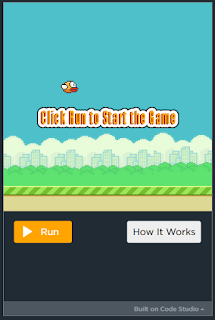
Using code.org, students can learn coding basics. I have been using this with my class during our STEAM sessions. Students work at their own pace through the tutorials.  When students are ready, they can have a go with the projects available on the site.  Each requires students to think creatively, problem solve and use algebraic thinking. When using this in my sessions, students made connections to the algebra learning we have been covering. Each time, they had to find the 'rule' to move their sprite.  Below is my attempt at making a 'Flappy Bird' game using code.org.

I'm glad I learnt have to add this to my blog as this is what my students are hoping to do.


Certificate for Venessa Davan
Hour of Code - Original Maze
Certificate for Venessa Davan
Hour of Code - Flappy Bird Edition


Scratch and Makey Makey
Using Makey Makey, Anna and I created our own musical performance. Students can share learning with whanau, by creating interactive displays using Makey Makey. Possibilities could include sharing their pepeha, creating stories, set of instructions, each one linking to a previously recorded voice sharing the matching information. 

Scratch

Using scratch, I have created the following animation. Students will be able to create animations, linked to our current learning. At the moment we can learning about the procedure of a powhiri. Students could create a short animation showing the order of proceedings of a powhiri.


Some of my other creations include:


Wednesday, 23 May 2018

DFI Session 4

Creating

Back in the days students used many natural resources to create learning - making huts, weaving flax, build mud sculptures, etc. These days we need to think about ways that we can allow this freedom to create for students, using digital technologies. Many options are available for this purpose: stop motion animation, videos, writing music, virtual tours of the world, and so much more.

The illiterate of the 21st Century will not be those who cannot read ad write, but those who cannot learn, unlearn and relearn.

Youtube

Creating playlists for students to view can decrease distraction for students viewing irrelevant videos. Below is a playlist I have created to experiment with this new learning.  Embedding playlists (like how I have done here) into class sites makes it easier for students to access the right video, first time.  My next learning steps are to remove the 'extras' that are part of youtube, ie, removing the comments, the side view, and the option to view the videos in youtube, rather than remaining on the class site.


Live Streaming

Students can live locally, but learn globally. This can be used to live stream sporting events to whanau, but also throughout the school so that students can watch the events as they happen in class.

Google Draw

Had a go again today creating buttons using google draw. I created buttons that will be used for our new school site, giving students access to all their learning and blogs. Google draw can also be very useful when creating infographics.  Pictures can be loaded to google draw, and overlays can be used so that when clicking in certain parts of a picture, it could link you to another page, or give some information.  This would be great for our current learning about the Marae. Students can create an infographic labelling the parts of a marae. 


Google Slides

Google slides are useful for creating animations, lesson plans and much more.  From what we had learnt today, I'm excited to give google slide a go for my planning. I'm hoping to create a flipped learning environment for my target maths group (this is currently my teacher inquiry). Students would be able to access the slides at all times, meaning that any past learning can be 'rewinded' and revisited again.

Reflective Questions

What did I learn that could improve my confidence, capability or workflow as a professional?


  • Google slides for planning flipped learning content
  • Google draw for creating my class and school site


What did I learn that could be used with my learners?  


  • Google draw to create infographics
  • Google slides to share their learning - possibly use this with screencastify


Wednesday, 16 May 2018

DFI Session 3 - Digital Dig

Digital Fluency Intensive - Session 3

One thing that I will take back to the staff today (especially our laggards) is to not always look at the big picture relating to technology, what you need to know/be able to do at the end, but rather the little changes you can make along the way to support the big picture.

Connecting from last week


We had a discussion around the expectations within our student blogs. Many of us had concerns that parents may get the wrong idea about what has been posted, especially if a draft has been published, and parents assume it's a published copy. As a group we have decided that we can add headers to the top of each blog post. Students can use labels / tags to organise all blog posts into draft, draft 2, publish, cold sample, etc...

Cyber Smart

Don't focus on the negative. don't mention cyber bullying. instead focus on being cyber smart. Cyber bullying is the same as bullying out in the playground.

Digital Dig


Screencastify


Today we used screencastify to record our new learning from today. I chose to share my digital dig.
View my screencastify here.


Tags

Using tags are important when writing blogs. Students will need to use tags also when publishing to their blog.

Wednesday, 9 May 2018

DFI Session 2 - Google Maps

Maps

Today we learnt how to use google maps to create journeys.  I created a timeline of my life, showing where I have moved to over the years.

This could be great to use for creating timelines that involve travelling between places, such as I have done above.  Another great instance could be for our study we have just completed about the ANZAC's, and mapping all the countries that were involved in the war.

Another example could be linking to students whakapapa. Where have we all come from? This would be great when learning about diversity, etc.


Sheets

Today I learnt the basic of google sheets. Sheets and Excel have never been a strong point for me.  Things I learnt to do today include:
  • Tracking students progress
  • Locking sheets, or certain cells that are not to be edited
  • Receiving notifications when someone has edited my sheet
  • Data Validation which creates drop down menus in sheets
  • Using the EXPLORE button in sheets to search for information.
  • Creating graphs with the data


Forms

Forms can be used for many purposes. I have created in the past a form that would allow parents to update contact information, without the need to call the school.  Forms can be used the gather opinions, create quizzes, etc. I would like to look into the use of Forms for our school's Peter Spelling Assessment. This would be self marking using the add-on Flubaroo.

Wednesday, 2 May 2018

Digital Fluency Intensive #1

Digital Fluency Intensive

My learning for the day included:


  • creating a collaborative doc, where students each add their learning, before sending it to another person to add more.
  • add-ons like change font, easy accents, read write, icons by nouns (for picture stories)
  • Creating posters using google docs
  • Sharing and saving google docs for ease of access
  • Use "convert' files in settings to convert handwritten sheets (taken as a picture) in a word document that can be edited.


Saturday, 28 April 2018

Term 1, 2018 Reflection

Term 1, 2018 Reflection

This term is the first time in my teaching career where I taught in an ILE environment alongside another colleague. At the end of the term we had 52 students in our care.  This is been a new learning journey for both Deb and I.  

It has taken us all term to find our feet, set expectations, get to know the kids, and iron out some challenges.  The first challenge that arose was the location of stationary and equipment.  With our students learning across two spaces to create our ILE, it meant that students had books, etc in both spaces.  This was a nightmare at the start, students not being able to find their belongings and not knowing where to start looking.  We decided to have all our student's books in tote trays stored in one space so students always knew where to go looking.  This created the next issue of students having to remember which hub they would go to next for their next lesson in order to make sure they have their tote trays and belonging in the right hub.  This is still a work in progress, but we have the maths rotation sorted.  

The next challenge we both face is the lack of time we have with each child.  With there being 52 students, we find it challenging connecting with each and every child on a daily basis to build strong relationships for learning. Some students haven't been in either of my learning groups, which means I haven't been able to connect with them on a learning level, and it means I have no idea where they are in their learning. I'm hoping as our groups change next term,I will be able to connect with a few more learners.

My biggest challenge I face, is working alongside my colleague, knowing that not all the decisions lay with me. Having worked in single cell classroom environment my whole teaching career, I have never had to check with anyone before changing my daily plans, ordering stationary, deciding on teaching/learning topics, etc.  Being consistent is also very important. We need to have clear understanding of each others expectations and boundaries as to not confuse the students. I have not wanted to say one thing to my students only to find out that my Colleague has said the opposite.  This meant that I have taken on more of a backseat approach, checking in with her before giving any instructions. This at times makes me feel as though I am incompetent, however I know it is just as to not step on any toes. I do feel however, the more I take the backseat approach, the less competent I will become, especially when moving back to a single cell again one day. This is where I will need to find the balance for myself.  Deb and I have discussed this and have agreed that we should have set days to be 'in charge'.

With all the challenges that have faced me so far this term, I do feel that lots of meaningful learning has occured and I have changed my practice therefore. Deb is a very experienced teacher with a wealth of knowledge, having shown significant shifts in student learning across the curriculum throughout her teaching career. I have enjoyed shadowing her, seeing what she does that makes a difference, and applying it to my own practise. So far we have made a great team and have worked well together. I look forward to us growing as a team this year, because together we can achieve great things with our students.