Showing posts with label Design for Learning. Show all posts

Monday, 31 July 2023

ADSA: Success in School Workshop: Day 1

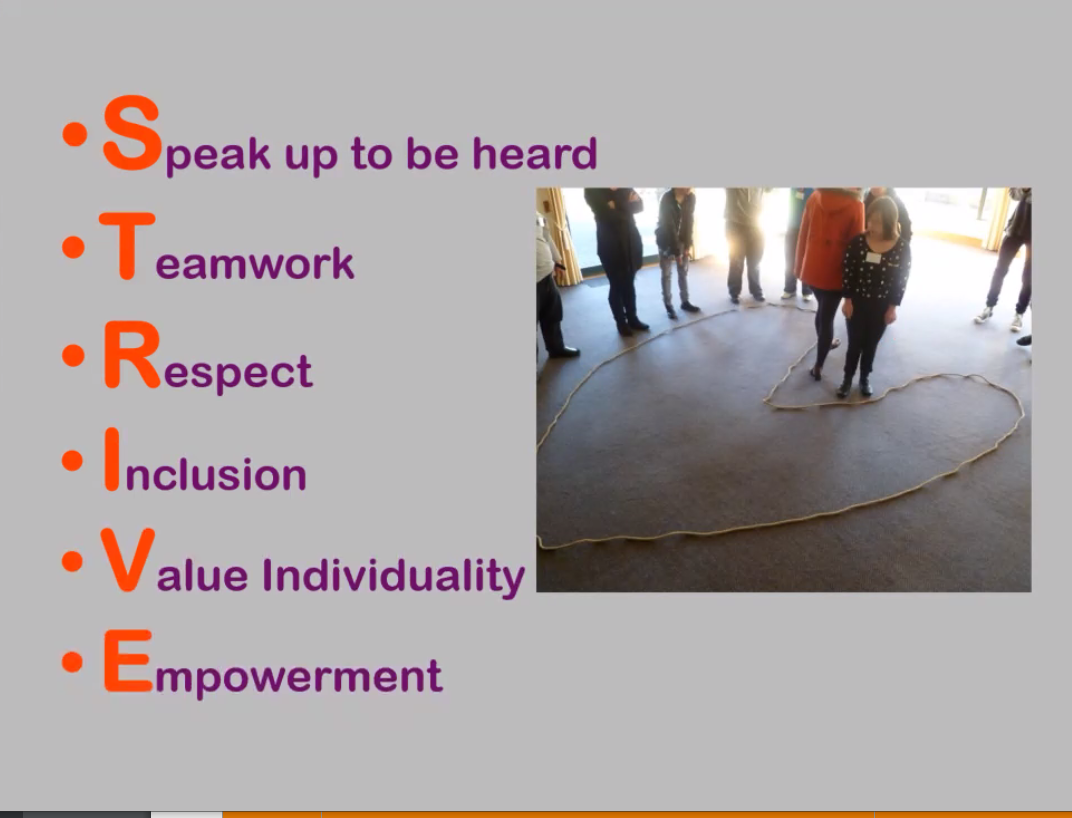
 Hearing from Edward Borkin, sharing his story growing up with down syndrome. He is a founding member of STRIVE, Their main goal is:


Universal Design for Learning with Dr Jude MacArthur

When planning, plan for everyone is mind, from the start. Focus on what they can do, rather than what they can't do. 

Things that can support children include:
  • Ensuring everything is in logical order.
  • Have instructions written down with steps (visuals important here)
  • Talk slowly and communicate clearly. Use sign. Teach this to the whole class!
  • Keeping background noises to a minimum. (Can encourage students to use headphones for a quiet space)
  • Give more time to process, especially during testing situations.
  • Front load where possible. 
We need to remove barriers! Focus on the universal solution that can benefit everyone in class. 


Learning profile of students with Down Syndrome with Paula Beguely

There can be many things that we need to consider when we have a child with down syndrome in our classroom. 


Hearing - Often children with down syndrome have smaller ears and smaller ear canals, making hearing harder for them. Glue ear can become a barrier too. This is often like trying to listen to someone talking underwater. 

Vision - Often children with down syndrome may need glasses. They also often confuse colours. They are not colour blind, but may confuse orange, red and brown etc. Ensure they see the colours you are seeing. 

Low Muscle Tone - Children can get tired easily. They may even need to rest against something or lay down. This may come across as behaviour or not managing self, but isn't!

Pain - This is something to discuss with families. There may be some confusion around what is happening and the feeling they are experiencing. There is a chance they may not be able to explain what they are experiencing or may not react as we would expect. For example, the presenters daughter had trapped her finger in the cardoor. She only reacted when her mum came outside to see where she was.

For this reason, all injuries need to be reported to the parents regardless of severity. 

Speech - this can be impacted from hearing barriers, cognitive conditions and low muscle tone. 

There may also be other medical conditions present. These need to be discussed with the families. 


Have visual prompts, time tables etc available for the students.  Also remember that it can take up to 10 seconds to process information or questions, so allow that time when asking questions. 

We also need to consider whether our students in our class may be sensory seeking or sensory sensitive.

Sensory seeking - jumping, crashing, banging into things, spinning, chewing on things, stomping, placing items heavily
Sensory Sensitive - school bell too loud, overreaction, unexpected things, difficulty with teeth brushing, haircuts.

As there can be loads of challenges and barriers, focus on the strengths of the students.
  • Visual awareness
  • Responds well to praise
  • Reading and Writing
  • Thrive with structure and routine

Ensure we teach things correctly from the start, because once it has been added to long term memory, it can be hard to unlearn!

Understanding & Supporting Behaviour with Arul Hamill


When dealing with behaviour, we need to be doing the noticing for the students. We need to notice their body signals and identify these with the students for them to be able to notice these themselves.  Students with down syndrome take longer for them to notice their own body signals. 


When there is a heightened feeling, for example student with anxiety, or feelings of anger etc, they can't always hear or process verbal feedback. Use visual cues as needed. 


Many students, regardless of illness or disability, struggle with physical calibration. This is something that we need to model and practice with our students. For example, What is gentle? Slow? How does it feel? This is especially important when looking at students running in the classroom, pushing in line etc. 

When looking at behaviours that are unwanted, look at the behaviour and what lead up to it. What is happening during and after. Discuss these with the students to develop that understanding.

Always teach a functional equivalent behaviour! For example, instead of hitting, encourage high fives. 


Friendships with Fehm Hussain 


Connections before content!

When trying to encourage friendships, rather than saying, "Who is looking after Child today?" instead say "Child is having a challenge today on the monkey bars to see how long they can hang on. Whose up for the challenge?" It removes the stigma that the child cannot make their own friends, or being helpless.

Ensure there isn't a heavy teacher-aide or adult presence all the time. We don't want to interfere with friendships forming on their own.

Teach problem solving skills rather than removing the problems. 

Could have a coreboard. With permissions from families, a photo of each child and their name can go home with the child so they can have conversations about friends at home with their fmailies. 

Things to consider:

High viz for duty teachers?
Often the students will gravitate towards the adults, but for the duty teacher to re-engage the students with other children.


Wednesday, 1 July 2020

Manaiakalani Staff Hui

Mapic with Dr Naomi Rosedale


Students have access to range of new tools and skills which they are able to use to transform their knowledge, rather than just acquiring it. Important here is for the students to be able to get their own voice across - What is the students lens when they are creating? This is where they are able to include their own identity, culture, etc to share their learning in their own way!The most magic happens here when students create their own DLO's, rather than being direct by the teacher - Teacher created DLO's. Here we want to focus on the students transforming their learning to further develop language, literacy and learning.


From Dr Naomi Rosedale research's, she has highlighted that these are the five elements that make the most difference to students acceleration of their learning.


How can we put more ownership on our students to learn more deeply creating through the process of design for learning? Students will need to think about the modes when sharing their learning. What mode will enhance this sharing of learning more?
Video, audio, visual, written...
Highlight of key vocab has shown to have a greater impact on overall DLO.


This is the MAPIC framework. I would be very interested in unpacking this further, and perhaps have this re-written into child speak.

Use the middle section to question my thinking to nudge our students learning further in create. 


Using the information shared by Dr Naomi Rosedale, as a teacher/facilitator,
  • How could we use MAPIC to ‘nudge’ our create pedagogy?
  • How can student design-for-learning offer a springboard to HLPs (including T-Shaped literacy)?
  • How can the ‘new’ modes hold transformative ways of create-to-learn (and share) such as student voice over, podcast, screencast, group discussion) in everyday teaching & learning?

Thursday, 26 September 2019

Design Thinking

For the first part of our Manaiakalani Hui, we engaged in a team-building exercise.

The first fun activity was to play a variation of rock, paper, scissors called Ninja, Tiger, Granny.  Played like rock, paper, scissors; whoever wins goes ahead to the next person, and the losing person becomes the support person and creates a chain. A great ice-breaker.

The focus of the day was around design thinking. Design thinking has a human-centred core. The important message here was not to get stuck on your own ideas, to be critical and accept feedback. You need to be willing to let go of ideas that perhaps didn't meet the requirements of the customer.


To prepare ourselves for design thinking, we were asked to draw a buddy in a short space of time. This was to promote the idea that you shouldn't apologise for our ideas and designs, instead take on feedback instead.


Learning about the design thinking process, we worked in groups and completed practical, hands-on activities.  The first stage of design thinking is to empathise with the consumer/customer. We were asked to go into a cafe, order a coffee, and empathise with a customer around their cafe experience.  From that, we came back with some issues that may arise for our customer. This is the "define" in the process.

In our group, we made up our own customer, based on our own experiences and anxieties we face when going to a cafe. We came up with Danvery. Brilliant drawing, thanks Anne.


Ideate is the next step in the process, and we thought about so many different ways that we could solve the issues our customer faced/faces. We had so many ideas, some doable, others were very out there. We marked our ideas using the following scale.


The fun had only just begun! We had to prototype our solution. I think we were a bit ambitious with our solution. We designed edible coffee cups, and you could choose out of five cups - sweet, bitter, salty, sour and umami.


Our idea:  A garden wall, ambience music, hologram at each table which can state where all the ingredient came from, and edible coffee cups. So fun to act out and test our prototype with a customer. 

Monday, 29 July 2019

Term 3 Professional Inquiry


What are the priorities for my target learners? How are they going in relation to these priorities?


Scanning:  Target students are not able to identify what they need to be able to improve their learning. 

Focusing: I would like my students to focus on setting goals within the writing curriculum to improve their output quality.

Inquiry Question: Will using goal setting strategies with my target writers make them able to choose sensible ‘next’ steps. How will the goal-setting look? What resources will I need to support these students to set SMART goals?

Developing a hunch:  
I will need to
  • Unpack Level 3 of the New Zealand writing expectations with my students.
  • Provide exemplars of what each of the expectations looks like within level 3. 
  • Unpack students writing, and identify which areas they need to improve on.
  • Encourage students to order their areas of improvement, starting with areas that will make the most impact on their writing.

What do I need to know/learn in order to effectively respond to these priorities?

  • Expectations of Level 3 writing
  • Exemplars of level 3 writing
  • How to set SMART goals with students
  • How to unpack the literacy progressions into kids speak with the students.

Therefore what are my development goals?

Taking action: 

Monday, 22 July 2019

TOD - Christine Davies - High Expectation Teachers

Christine Rubie Davies - Teacher Only Day - Research on high expectation teachers and the effects on students outcomes. 


Mixed-ability grouping - provides students with more motivation to persevere with their learning. When students are in ability groups, they quickly are able to identify where in the hierarchy they are. Provide more opportunities for lower-level students at the same level as everyone else.

How can I change my reading, writing, maths groups to allow for more mixed ability learners?
Useful links to support Mixed ability grouping in maths - TKI  and Youcubed

Motivation

Extrinsic motivation - Tangible rewards significantly and substantially undermine intrinsic motivation… there is indeed reason for teachers to exercise great care when using rewards-based incentive systems.

Non-contingent vs contingent rewards - When students expect a reward for their behaviour, the behaviour is less likely to continue to happen naturally.

Benefits of intrinsic motivation -

  • Persistence
  • Creativity
  • Conceptual Understanding
  • Optimal functioning and well-being
Benefits of using student interests
  • Strengthen students motivation
  • Promotes peer communication
  • Reduces disruptive behaviour
  • Enhance student-teacher relationships
  • Promotes active learning
  • Increases responsibility for own learning
Setting Goals
  • Need to be realistic, achievable, measurable.
  • Goals should be focussed on gaining skills, rather than competing with others. 
  • Provide feedback 
    • based on the learning intentions
    • which becomes the basis for setting goals
    • based on progress
  • Long term goals need short term goals to work towards and needs to be monitored and reset often. 
Key factors of effective goal setting.
  • Motivation
  • Attention
  • Challenge
  • Feedback
  • Self-efficacy
  • Self-regulation
  • The proximal versus the distal nature of the goal
  • Self-set versus teacher-assisted goals 


Wednesday, 3 July 2019

Focus for Term 3 - Accelerating Literacy Learning in Writing.

This term I have identified 6 students that need a boost with their writing development. I have never been part of the ALL programme, but with support from my colleagues, I intend to run a 5-week intensive writing programme for these 6 students.

These students have shown that they struggle to generate and develop their ideas. Over the next couple of weeks, I will be reading a variety of publications and resources to find activities, lessons and ideas I can use next term with this group. I will be sharing all the resources and ideas here and will reflect on how they were used during the term to come.

Today I came across the "success for boys" page on TKI. This was recommended to me by another colleague. The first resource that stood out for me was the story starters. These look great.  Students watch an animated short film and then have to write what they think would happen next.  This would great for students to discuss vocab, creative ideas, etc.


Another resource on the Success for Boys page was the "Game of Awesome". I have used this before in my class, but not to the extent identified on the Teacher Support Material. I like how the students are able to plan out their story using the templates provided. Once students get into this game, the next step could be to create their own cards using the templates provided. This will give the students a purpose for writing.

Wednesday, 6 June 2018

DFI Session 6

DFI Session 6

What I have tried before this session:


  • Students posting their blog profiles to their blogs.
  • Students using screencastify to record how to post to their blog.
  • Share their screencastify video onto their blog also.

What I need more support with, or what hasn't work:

  • Lack of devices in our classroom to fully implement all learning
  • Students needing more time to familiarize themselves with google and the device, ie. navigating between tabs, etc.
  • Students knowing how to make a copy of a document correctly, naming it properly, and saving it in the correct folder.

Visible Learning

The Manaiakalani kaupapa is for all learning to be visible.  This includes the learning, planning, etc.  This is why creating class sites. Students can share - this is what I'm learning, this is the purpose of my learning. This is beneficial to teachers also, as more ideas are shared across schools. Teachers can access other teachers sites to find ideas, resources etc.  

Having all learning, including student blogs, visible creates connections between home and school. The sites allows students to read what's in the teachers mind. 

Having learning visible ensure there are no surprise. Students know where they are starting from and where they are going. 

Hapara enables visibility for the teacher to see where students are, what they are doing, follow up on work etc. 

Keeping learning visible makes it easy for anyone to access. As soon as you put up barriers like passwords etc, people usually only try a couple of times then give up.  Then this is a learner lost, or a lost connection with whanau.

Tuhi Mai Tuhi Atu

A collaborative sharing platform using blogger to connect to a school. This is something I would like to have a look at doing next year when our students have their learning blogs up and running and we have 1:1 devices. Students make comments on other students learning. 

Hooking Student in

Teachers at Pt England school hook students into their inquiry learning at the start of each term. This is showcased as a large assembly at the start of each year.  An example of new entrants teachers can be viewed on this slide, slide 6.


Google Sites

Today we are creating google sites.  We were given information to use, and with that we had to create an engaging site for our learners.  In our group, we created a garden breakout. This requires students to find hints on the site, to answer questions on a form. Here is my example.


Reflection

Today was an exciting day for learning. I have enjoyed learning more about google sites and how they can create a learning platform for students to use, for example a hook into an inquiry topic. 

Thursday, 31 May 2018

Experimenting with Slides with my students

After our DFI session 4, I was excited to continue building my class site, as well as using slides to make my planning and teaching 'rewindable' for students.

I have a long way to go towards creating my own learning videos for students, but to experiment with my new learning, I was able to embed a relevant youtube video into my slides.  My slide is also embedded into my class site, for easy student access.

The only big issue that I face at this time, trying to make learning sites and learning slides available to my students, is the lack of technology in my class.  I can see the benefit of students being able to access all my lessons and links at all times, but until we have 1:1 devices with our students, this won't be effective or even viable.

I will continue to work on my site and slides, in preparation for the day we have access to 1:1 devices for our students. I'm excited about the prospects of this, and the opportunities for learning this will create for our students.


Wednesday, 23 May 2018

DFI Session 4

Creating

Back in the days students used many natural resources to create learning - making huts, weaving flax, build mud sculptures, etc. These days we need to think about ways that we can allow this freedom to create for students, using digital technologies. Many options are available for this purpose: stop motion animation, videos, writing music, virtual tours of the world, and so much more.

The illiterate of the 21st Century will not be those who cannot read ad write, but those who cannot learn, unlearn and relearn.

Youtube

Creating playlists for students to view can decrease distraction for students viewing irrelevant videos. Below is a playlist I have created to experiment with this new learning.  Embedding playlists (like how I have done here) into class sites makes it easier for students to access the right video, first time.  My next learning steps are to remove the 'extras' that are part of youtube, ie, removing the comments, the side view, and the option to view the videos in youtube, rather than remaining on the class site.


Live Streaming

Students can live locally, but learn globally. This can be used to live stream sporting events to whanau, but also throughout the school so that students can watch the events as they happen in class.

Google Draw

Had a go again today creating buttons using google draw. I created buttons that will be used for our new school site, giving students access to all their learning and blogs. Google draw can also be very useful when creating infographics.  Pictures can be loaded to google draw, and overlays can be used so that when clicking in certain parts of a picture, it could link you to another page, or give some information.  This would be great for our current learning about the Marae. Students can create an infographic labelling the parts of a marae. 


Google Slides

Google slides are useful for creating animations, lesson plans and much more.  From what we had learnt today, I'm excited to give google slide a go for my planning. I'm hoping to create a flipped learning environment for my target maths group (this is currently my teacher inquiry). Students would be able to access the slides at all times, meaning that any past learning can be 'rewinded' and revisited again.

Reflective Questions

What did I learn that could improve my confidence, capability or workflow as a professional?


  • Google slides for planning flipped learning content
  • Google draw for creating my class and school site


What did I learn that could be used with my learners?  


  • Google draw to create infographics
  • Google slides to share their learning - possibly use this with screencastify


Wednesday, 16 May 2018

DFI Session 3 - Digital Dig

Digital Fluency Intensive - Session 3

One thing that I will take back to the staff today (especially our laggards) is to not always look at the big picture relating to technology, what you need to know/be able to do at the end, but rather the little changes you can make along the way to support the big picture.

Connecting from last week


We had a discussion around the expectations within our student blogs. Many of us had concerns that parents may get the wrong idea about what has been posted, especially if a draft has been published, and parents assume it's a published copy. As a group we have decided that we can add headers to the top of each blog post. Students can use labels / tags to organise all blog posts into draft, draft 2, publish, cold sample, etc...

Cyber Smart

Don't focus on the negative. don't mention cyber bullying. instead focus on being cyber smart. Cyber bullying is the same as bullying out in the playground.

Digital Dig


Screencastify


Today we used screencastify to record our new learning from today. I chose to share my digital dig.
View my screencastify here.


Tags

Using tags are important when writing blogs. Students will need to use tags also when publishing to their blog.

Wednesday, 9 May 2018

DFI Session 2 - Google Maps

Maps

Today we learnt how to use google maps to create journeys.  I created a timeline of my life, showing where I have moved to over the years.

This could be great to use for creating timelines that involve travelling between places, such as I have done above.  Another great instance could be for our study we have just completed about the ANZAC's, and mapping all the countries that were involved in the war.

Another example could be linking to students whakapapa. Where have we all come from? This would be great when learning about diversity, etc.


Sheets

Today I learnt the basic of google sheets. Sheets and Excel have never been a strong point for me.  Things I learnt to do today include:
  • Tracking students progress
  • Locking sheets, or certain cells that are not to be edited
  • Receiving notifications when someone has edited my sheet
  • Data Validation which creates drop down menus in sheets
  • Using the EXPLORE button in sheets to search for information.
  • Creating graphs with the data


Forms

Forms can be used for many purposes. I have created in the past a form that would allow parents to update contact information, without the need to call the school.  Forms can be used the gather opinions, create quizzes, etc. I would like to look into the use of Forms for our school's Peter Spelling Assessment. This would be self marking using the add-on Flubaroo.